
We literally wrote the book on Proxmox installation: Download it Here
VMware Alternatives Slideshow: Download it Here
VMsources can provide all your Proxmox needs! No matter the scale of the project; from on-premises Compute to full Data Center deployment - we can help. Our Proxmox Consultants are the best in the business and have years of experience helping our clients get the absolute most from their Infrastructure investment, easy as 1-2-3:
1. VMsources Solutions Architects (SA’s) will help scope the Proxmox deployment that’s right for your organization – no BS, guaranteed!
2. Then we’ll provide vendor-agnostic specifications for your Proxmox deployment along with quotes for servers, licensing and installation.
3. Then we’ll help you install, configure, migrate, train and manage your entire Proxmox environment.
Buy Proxmox Plans Direct from VMsources. Current prices as of today.
$1,229.80 /year
$614.90 /year
$413.66 /year
$134.16 /year
Proxmox Scope and Design
Let VMsources scope your Proxmox cluster from the ground up. We’re going to help you choose weather using existing hardware and SAN is appropriate, or if a hardware refresh is in order? Fortunately, Proxmox has a wide HCL and supports most all types of SAN storage, so it will install in-place of most other hypervisors and use most existing SANs. When new hardware is in order, we’ll help achieve the best for ROI by providing suitable technical choices for your organization.
Vendor-agnostic specifications
Once we’ve scoped your Proxmox cluster, we’ll create vendor-agnostic specifications that you can use to obtain quotes from any vendor, along with our own quotes for HPE Servers, Proxmox licensing and on-premises installation services. Feel free to use our quotes to obtain competitive quotes from other vendors. In the end, we don’t care who you get your servers from, VMsources would like to do your installation on any server you choose!
Install and Configure
When it comes time to deploy Proxmox and/or migrate from another platform, VMsources hands-on approach will assure the smoothest process possible. Most deployments take between 3 and 5 days, resulting in a best-practices Proxmox cluster supporting your workloads. Not only that, but we’re going to work with your staff, so knowledge transfer is going to come naturally. On completion, will provide a Runbook document with all the technical specifics of your installation. We literally wrote the book on Proxmox installation: Download it Here
Why choose Proxmox?
At VMsources, we believe Proxmox is the best Infrastructure alternative to VMware. Not only is Proxmox cost-effective, but it is also true enterprise open-source, avoiding the proprietary lock-in of closed-source platforms like VMware, Nutanix and Hyper-V.
Why is open-source important? Simply put, closed platforms can be sold and/or change the way they treat their customers at any point; whereas Proxmox is AGPL licensed and could be forked at any point the user community felt that Proxmox Server Solutions GmbH was no longer representing them well.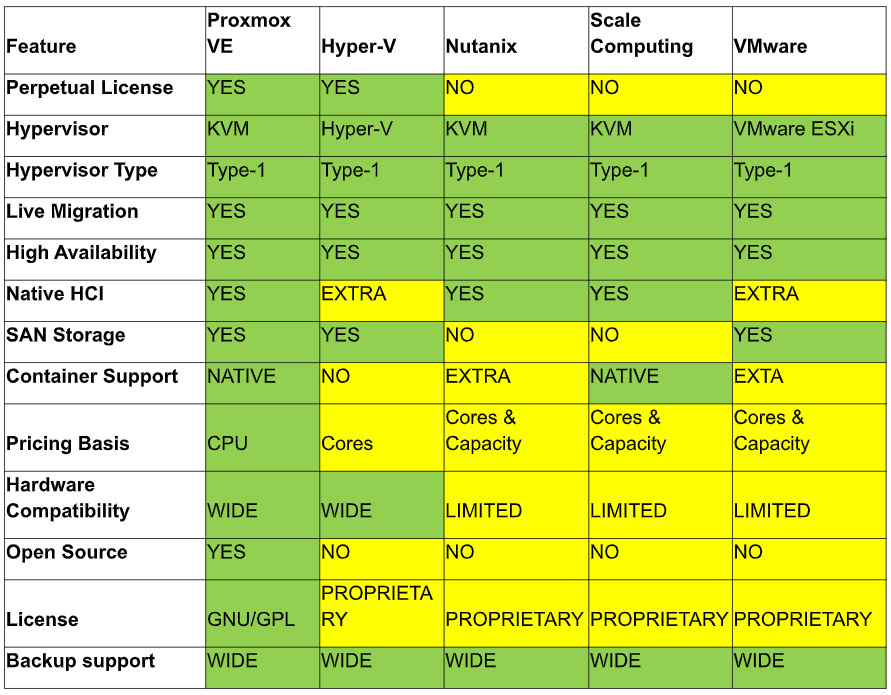
VMware to Proxmox migration
Let’s face it: Most VMware customers are either considering leaving the platform or have already decided to do so. Check out our VMware Alternatives Slideshow: Download it Here
What has Broadcom done to alienate customers?
- Eliminated “perpetual” licensing
- Increased cost across the board
- Loss of value/equity in VMware licensing under Broadcom
- Initially introduced several lower cost “subscription” licenses
- Lured customers with vSphere Standard and vSphere Essentials Plus
- Subsequently discontinued lower-cost subscriptions
- Customer service under Broadcom
- Pay-walled vSphere updates
- Moved aggressively against customers who continue to use “perpetual” licenses
- Eliminated most existing channel/resale partners
When we migrate from other hypervisors to Proxmox, we use a variety of tools to achieve success with both modern and legacy virtual machines. Our favorite migration method is using Veeam to backup the workloads on VMware and then restore them to Proxmox. Veeam is fast, effective and can be batched to perform many backups and/or restores at once. For a few legacy OS’s, we have found the Proxmox native migration utility to be effective.
Proxmox licensing and subscription
Proxmox is officially free to install and use: Any scale, all features, forever! Most customers are going to want to consider a subscription, however, as that entitles you to varying levels of support directly from the experts at Proxmox.
Proxmox subscriptions are based on CPU count (not cores!) providing a huge advantage for customers who already have high-core CPUs or are considering a hardware refresh.
Official pricing is based on Euros, however VMsources offers Proxmox licensing in US Dollars, enabling organizations to accurately issue POs and receive the products specified.
When you buy Proxmox from VMsources, we will perform the following services for FREE:
- Scope your existing environment to determine suitability for Proxmox
- Provide vendor-agnostic hardware specifications (if required)
- Provide an actionable quote for HPE servers that you can also use for competitive pricing
- Provide a quote for VMsources to install and migrate your workloads to Proxmox
Get a Proxmox Quote Today
FAQ:
Q: What is Proxmox Virtual Environment (PVE)?
A: PVE is a Virtualization and Cloud Computing platform based on a Type-1 Hypervisor, functionally
equivalent to other Type-1 platforms like VMware, Nutanix and Hyper-V
Q: What does it cost to use PVE?
A: Nothing. PVE is AGPLv3 licensed and installations of any scale, using any/all available features
can be done at no cost to the user. Proxmox Support subscriptions have a cost associated with them that varies with the amount of support required.
Q: How do you manage PVE?
A: Primarily using a web client GUI, just like VMware and Nutanix
Q: How much command line is involved in PVE use/management?
A: For day-to-day tasks, there is very little need for the command-line. Tasks such as: building VMs, configuring networks, backups and restores are all performed in the web client GUI.
Q: When is it necessary to use the CLI?
A: During installation or while performing tasks such as adding/increasing storage the CLI may be required and is often more effective than the web client GUI.
Q: Will a former VMware admin be able to handle migration to PVE?
A: Absolutely! The user interface is very intuitive. Environments which have less experience with Linux/CLI will want to consider a MSP such as VMsources to help with infrastructure tasks which require the CLI
Q: What are the limitations of Proxmox support subscriptions?
A: Proxmox Server Solutions GmbH is available Monday through Friday from 7:00 to 17:00 CET/CEST (01:00 to 11:00 EST), excluding Austrian business holidays.
Q: What can I do if there’s a problem during normal business hours in North America?
A: North Americas MSPs such as VMsources are available to provide support during business hours in North America.
Q: Is VMsources available for on-call support for PVE?
A: Yes, but there are steps we will need to take care of first, such as NDA’s